
Lou and Gina Park
Awesome customer service!
Response from the owner
Thank you, Friends! So glad it worked out for you!
Systems of Nevada's security camera systems include remote viewing, so you can watch live video and recorded footage from a smartphone, tablet or computer. We set it up on your devices and teach you how to use it before we leave.
A camera system you cannot check from anywhere is half a system. Remote viewing is what lets you look at the house from work, the cabin or the airport. We set it up correctly the first time, and several Google reviewers mention our technicians teaching them the app.
Key points
With remote viewing you can open the app and see your cameras live, scroll back through recorded video, and look at a particular time when something happened. On many systems you can also receive notifications when a camera detects something.
Phones, tablets and computers each work, so you can use whichever is closest, and more than one person in the household can be given access.
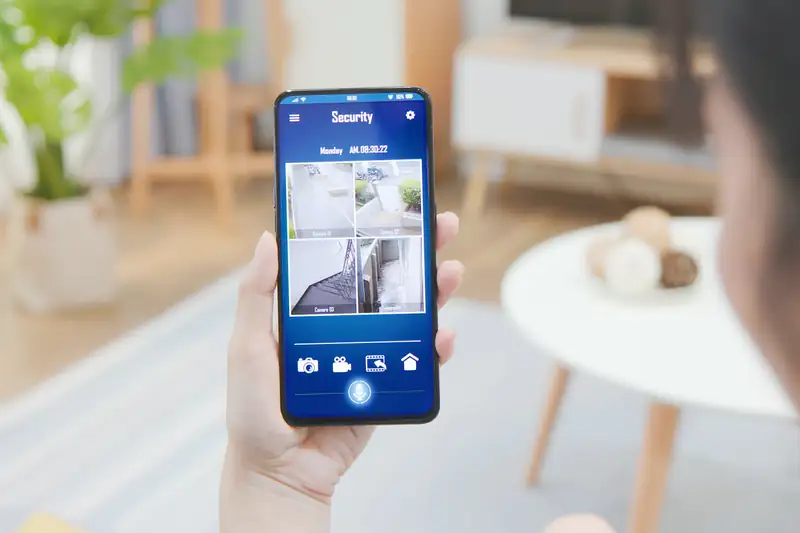
Remote viewing depends on the recorder or cameras being reachable over the internet and your network being set up to allow it. Done carelessly, that can leave a system open to people who should not see it. We set accounts with strong credentials, name the cameras clearly and keep the settings tidy.
We go over the setup with you, including which devices have access, so you know exactly who can see your video. Our guide on Nevada security camera and recording laws is worth a read if cameras cover areas that neighbors or guests use.
Several Google reviewers mention the same thing: our technicians were patient, they taught the app after the installation, and the customer felt able to use the system to its full potential. A client said that Jordan was a great teacher after installing the new system, so they could learn to use it fully. Another said Matt walked her through the app step by step.
We sit down with you at the end of the job, put the app on your devices and have you try it. If you have questions a month later, you can call our office.
If your cameras are already installed but you cannot get them on your phone, we can often set that up. We look at the recorder, the cameras and your network and make the connection. If the equipment is too old to support it, we will say so and suggest options in camera system upgrades and repair.
Businesses with several locations can have remote viewing across sites, which ties in with our video surveillance installation.
Watch live and recorded video on whichever device you have.
We handle accounts, network settings and camera names.
Reviewers praise our technicians for teaching the app.
Give family or staff their own viewing access.
Yes. Once the system is set up, you can view live video and recorded footage from a smartphone, tablet or computer anywhere you have internet.
Often, yes. We check the recorder, cameras and network and tell you whether remote viewing can be set up or whether an upgrade is needed.
Yes. Our technicians put the app on your devices and walk you through live view and playback at the end of the job.
Yes. We can set up separate access for family members or staff.
We set up accounts with strong credentials and keep the settings tidy, and we tell you who has access. Your recorder is not left open to anyone.
Google Reviews
4.5
Based on 25 reviews
Read all reviews on Google (opens in a new tab)Write a review on Google (opens in a new tab)
Lou and Gina Park
Awesome customer service!
Thank you, Friends! So glad it worked out for you!
Don McCauley
Owner Steve exceptional response and dispatch timing. Tech Matt A+ for quick diagnosis and fixing the problem.
Thank you for sharing, Don. We are so grateful for your trust in Systems of Nevada and your kind words for our Team.
Pamela Henning
Matt and Christian did a great job-thorough and polite. Answered questions and went through the system with me.
Thank you Pam!!! Our Team is so grateful for you business and kind words for Matt and Christian. We're blessed to have an amazing Team. Thank you!
Shane Templeton
Jordan was terrific! He diagnosed the problems with our entertainment system, explained what the issues were, and fixed them expeditiously. Very kind and considerate demeanor!
We also appreciated that Steve and Ron responded immediately earlier this week when we reached out and were able to schedule Jordan's visit this week.
Hi Shane - thank you for your kind words for taking a minute to share...Our Team appreciates your trust and friendship!
Rachel Kuhl
Had a great experience with Matt at Systems of Nevada Inc. He made setting up our alarm system super easy and walked me through how to use the app step by step. Everything was up and running smoothly in no time. So helpful and professional — highly recommend!
Hey Rachel!!! Thank you for taking a moment to share your experience with Matt and Systems of Nevada. We're grateful for the opportunity to work with your Family and we truly appreciate your kind words! Thank you again!!!
Mike Puntoriero
Very prompt and polite service
Thank you for you kind words, Mike. We appreciate your business!
NANCY KERRY
Jordan, is great so helpful, kind, knowledgeable and is a great teacher after install installing the new system so we can learn how to use it to its full potential. The company is really great
Thank you Nancy...we are appreciative of your continued support and we're lucky to have a great Team!!!
Donald Intihar
I give Jordan 6 stars out of 5! He was quick, knowledgeable, and very friendly. I also appreciate that Steve at Systems of Nevada got to our house quickly to fix the problem. I highly recommend this company!
Thank you soooo much for your kind words! We're glad you're happy with your video doorbell!
Carolyn Hughes
These folks are amazing! The system they installed is incredible. Systems of Nevada provides top notch support.
Thank you so much for your kind review, Carolyn...we appreciate your support!